
EVIDENCE MATRIX
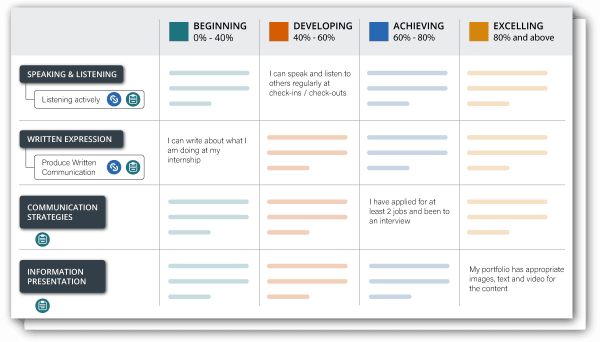
- The Evidence Matrix defines the elements of a skill and the earning criteria. It is the scoring mechanism which dictates whether a learner earns the credential and what associated performance information can be included in an evidence record.

- LEARNING OUTCOME
Understand the levels of element achievement, how they align to the curriculum and where they are assessed. Understand the levels of achievement that you will recognise digitally.
Why
- When recognising skills, the level of skill is important to define. It helps the learner, employers and others contextualise the learner’s skill in real-world settings. i.e. They may have communication skills, but at what level of proficiency? What does their level of communication skill indicate what they know and can do?
- Digital recognition of skills is based on evidence that they have the knowledge (in the curriculum) and have demonstrated application of the skill (in an assessment). Mapping elements to assessments enables evidence-backed skills credentials.
- Not all achievements are created equal. At what competency level will you award digital skills recognition?
What it is
- An Evidence Matrix is essentially a rubric defining the elements of the skill, and the levels of achievement.
- The purpose of the Evidence Matrix is to define assessment scores and align them to a level of performance.
- The Evidence Matrix can enable you to interpret data from the LMS or other student assessment data source.
- The Evidence Matrix is flexible and can be designed to manage complex awarding criteria (e.g. 40-60%, 60-80% etc.) or a simple pass / fail criteria.
- The output can be used as a report in the form of an evidence record which details how the learner performed against each element.
What you need
- Defined levels of performance (e.g. in mastery-based models, the levels might be defined as: Emerging, Developing, Achieving and Mastering).
- A solid understanding of how the skills are assessed in the curriculum and what the various levels of performance look like in terms of grading and awarding. The assessment criteria should align to the levels of performance (e.g. Emerging = 40-60%; Developing = 60-80%)
Where to get it
- Existing course rubrics and learning outcome statements can be useful inputs when designing the levels of performance.
- Note – completing this process can help you to identify which areas of your curriculum require redesign or redevelopment to align to skills. You may be decide to develop new activities and assessments to digitally recognise the skills you wish to issue credentials for.¹
- See the AI Pro Tip section below for ways you can use AI to help you complete this step.
- PUTTING IT INTO ACTION
- Open the worksheet used in the previous step.
- Building on the element names and descriptions, define a criteria for each level of performance.
- Determine the awarding criteria for each level and note it underneath the levels of performance in the column header.
- Identify where in the curriculum these skills and attributes are taught.
- Identify the measurement / assessment that will be used as evidence of attainment.
- In the column ‘Assessment method’, input the name of the assessment(s).
- In the column ‘Awarding criteria’, input under what conditions a badge will be issued (e.g. No badge issued for Level 1 attainment; Bronze badge for Level 2 attainment (40-60%), etc.)
AI PRO TIP
Ensuring you remain in compliance with your institution’s AI Policies, open an AI tool such as NotebookLM, Microsoft 365 Copilot Notebooks, Anara, ChatGPT, Gemini or similar.
- Input the skill definition and levels – input the Sub-competency Name (skill) and its definition (which you drafted in the previous step), along with the names of the performance levels you wish to define (e.g., Emerging, Developing, Competent, Mastering, Advanced).
- Input the prompt – use one of the example, structured prompts to instruct the AI to act as an assessment expert and generate the descriptions.
- Ask the AI to scaffold descriptions – ask the AI to draft the observable, measurable behavioral descriptions for each performance level, ensuring there is a clear, logical progression of complexity and independence from the lowest level to the highest.
- Review and refine – critically review the AI’s output to ensure the descriptions are contextually relevant to your course and that the progression (scaffolding) is smooth and defensible for assessment purposes.
prompt examples
Prompt (for Matrix Generation)
This prompt instructs the AI to take a single skill and its definition and generate all the required behavioral descriptions across the specified mastery levels, focusing on observable changes in complexity, independence, and impact:
“Act as a curriculum design expert specialising in skills recognition. Using the provided skill and its definition, generate descriptive statements for the following five performance levels: Emerging (0-40%), Developing (40-60%), Competent (60-80%), Mastering (80-100%), and Advanced (100% Exemplary).
Ensure each description is an observable, measurable behavior. The descriptions must show a clear, logical progression from reliance on guidance (Emerging) to independent action (Competent) to inspiring others (Advanced).
Present the results in a markdown table with two columns: ‘Performance Level’ and ‘Behavioral Description’.”
Skill: [Insert Sub-competency Name, e.g., “Demonstrate Self-awareness”]
Skill Definition: [Insert Definition from previous step]
Prompt (for Progression Refinement and Scaffolding)
Use this prompt if you have drafted a few statements and want the AI to refine them, ensuring the language smoothly progresses in complexity and independence, which is critical for valid assessment:
“I have defined a skill and its required behavior at the ‘Emerging’ (novice) level and the ‘Advanced’ (expert) level. Your task is to fill in the intermediate levels – ‘Developing’, ‘Competent’, and ‘Mastering’ – by generating descriptions that create a clear, measurable progression (scaffolding) between the two endpoints.
Focus on observable metrics such as level of guidance required, scope of impact, and ability to articulate reasoning. Output the five completed descriptions in a bulleted list.”
Skill: [Insert Sub-competency Name]
Emerging (Given): [Insert novice description, e.g., “Shows awareness of personal motivations with room for growth.”]
Advanced (Given): [Insert expert description, e.g., “Embodies profound self-awareness, inspiring personal and collective excellence.”]
Key Prompting Strategies
- Define the role – start by assigning the AI a persona (e.g., “assessment designer,” “curriculum expert,” or “psychometric specialist”) to focus its knowledge base on grading and performance measurement.
- Specify the output format – explicitly request a markdown table or a structured list to ensure the descriptions are clear, separate, and easy to transfer into a formal matrix document.
- Prioritise progression and scaffolding – this is the most critical strategy for this step. Explicitly instruct the AI to ensure the descriptions show a logical, increasing progression in complexity, independence, and scope of impact from the lowest level to the highest.
- Use specific terminology – ensure the prompt focuses the AI on creating observable and measurable descriptions, using terms like “demonstrates,” “proactively,” “identifies,” or “applies,” rather than vague terms like “knows” or “understands.”
¹ You may find as you complete this process, that your existing curriculum, course rubrics or learning outcome statements don’t align to the elements being taught and/or you are not currently assessing for the elements you wish to recognise. In this instance, redesigning or redeveloping your curriculum to explicitly teach and assess these will be required to complete the Evidence Matrix in full. Fortunately, this is typically a one-time mapping, that once completed, will only need to be updated if items change location in your LMS or similar data source.