
COURSES & STUDENT INFORMATION
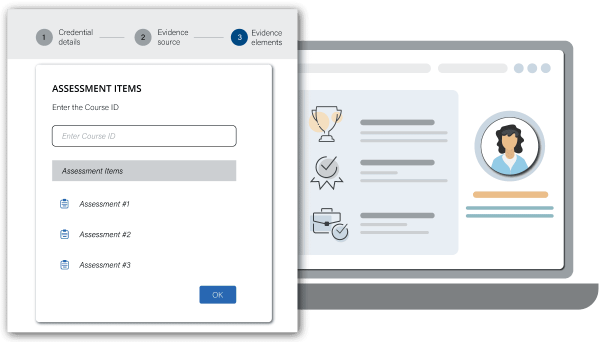
- A credential evidence platform (or similar) will require a source of student and performance assessment information for harvesting and measurement against the Evidence Matrix criteria. This can be an LMS or other data source.

- LEARNING OUTCOME
Understand where in your systems, student, curriculum and assessment data reside and be able to specify their location.
Why
- In order for educational technologies to connect your Evidence Matrix to actual results and issue recognition, you will need to point the technology to your sources of data.
What it is
- A credential evidence platform¹ will need a source of data for learners and their assessment scores and any artefacts to be included on an evidence record.
- This data source can be in the form of an integrated LMS or another data source that has been integrated via API.
- This source will be integrated with each credential’s Evidence Matrix when the credential is created so that the credential evidence platform can analyse and manage the awarding criteria.
What you need
- An understanding of those aspects of the curriculum that teach and test the learner’s capabilities in the skill.
- Details of the course and assessment details in the relevant LMS or data source.
- Learner data in the LMS including course enrolment and email contact details.
Where to get it
- From the data source.
- From your knowledge and understanding of the curriculum and assessments.
- See the AI Pro Tip section below for ways you can use AI to help you complete this step.
- PUTTING IT INTO ACTION
- Open the worksheet used in the previous step.
- In the column ‘Course name’, input the name of the course where the skill is taught.
- In the column ‘Assessment data’, input the location where the assessment data resides.
AI PRO TIP
Ensuring you remain in compliance with your institution’s AI Policies, open an AI tool such as NotebookLM, Microsoft 365 Copilot Notebooks, Anara, ChatGPT, Gemini or similar.
Collect public course text – if the course information is public, copy the text from the course description web page (including the Course Name, Code, and assessment descriptions).
Input public text – paste the collected course text into the AI tool.
Ask for metadata extraction – use the appropriate prompt (like Prompt 1) to instruct the AI to act as a cataloger and extract the Official Course Name, Course Code, and Assessment Titles into a structured format.
Identify internal gaps – use the AI to confirm which crucial technical/administrative fields (e.g., the precise internal Assessment/Assignment ID, API Path, or specific system identifiers) are missing from the public text and must be sourced internally from your LMS/SIS.
Validate and complete – review the AI’s output, then manually enter the required internal system IDs to finalise the administrative connection between the skill and the corresponding assessment data location.
PROMPT EXAMPLES
Prompt 1 (Data Mapping and Standardisation)
This prompt focuses on structuring the public course information and the internal administrative IDs required to connect systems, while safely omitting sensitive student data fields:
“Act as a curriculum data cataloger. I have pasted the public description for a course below. Extract and standardise the following administrative metadata fields required for a skill credentialing platform: ‘Official Course Name’, ‘Course Code’, and ‘Assessment/Assignment Title’. Additionally, help me identify the likely internal ‘Assessment/Assignment ID’ that will need to be sourced from the LMS. Present the findings in a markdown table.”
Required Data Fields to Map: Official Course Name, Course Code, Assessment Title, Internal Assessment/Assignment ID (to be sourced internally).
Public Course Text: [Paste the text copied from the public course information page here]
Prompt 2 (Identifying Necessary Internal Fields)
This prompt uses the AI to generate a clear checklist of the non-public administrative fields that the user still needs to track down internally:
“Using the provided public course information, list the key administrative data fields that are missing and will need to be obtained from an internal system (LMS/SIS) to correctly establish the connection for credentialing. Prioritise fields required to precisely identify the assessment instance (Assessment/Assignment ID, API Path, etc.).”
Public Course Text: [Paste the text copied from the public course information page here]
Key Prompting Strategies
- Specify input source – explicitly mention the input is “public course text” to manage the AI’s expectation of data sensitivity.
- Focus on standardisation – ensure the AI is trained to output the data using the official format for Course Codes and Assessment Titles.
- Identify internal keys – direct the AI to help identify the necessary Assessment/Assignment IDs or API path names that link the public-facing assessment name to the internal data system, turning the extraction into a useful checklist.
¹ In the Credentialate credential evidence platform, you can harvest evidence from multiple courses or assessment platforms for the one element. This is particularly useful when recognising durable skills, which are often taught in multiple courses or across multiple subjects.